- If you installed the file before 2020/12/16 and want to download a new file and re-install it, delete the existing "Hoshiusa" folder before installing it.
■ Update history 2020/11/27 ・ Release 2020/12/07 ・ Hoshiusa-2.0.Fixed a bug that it merges with another facial expression when using "Kokeshi eyes" in unity package 2020/12/16 ・ A little life in each unity package Added a raised model. -Fine adjustment of Viewpoint of small model-Set Emote switch to remove hood on 2.0 model-Fixed a bug in Emote to remove hood of 3.0
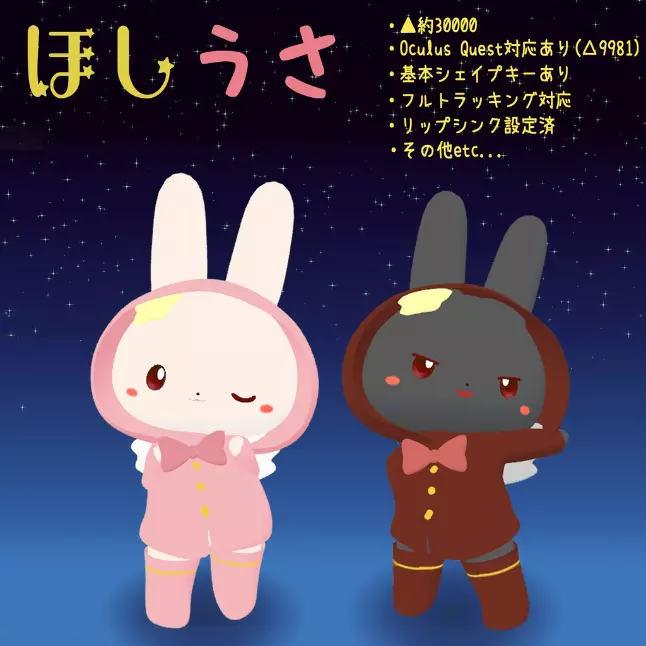
■ Overview This character is inspired by the rabbit mascot. At first I intended to wear kappa, but now it's normal clothes (laughs) The parts are separated so that the texture can be easily modified, so if you are interested, please try it. This model is used in VRChat. It is 3D model data corresponding to Unity's Humanoid format assuming. You can use it as you like, such as modifying it.
■ Explanation ・ △ Approximately 30000 ・ Number of materials 1 ・ Dynamic bone set ・ Oculus Quest compatible (△ 9981) ・ VRM version available ・ Sunao Shader used ・ Basic shape key available ・ Basic MMD morph set ・ Lip sync set ・ Full tracking Correspondence
■Notes
- The terms of use will be inherited, including in the text below.-Can be modified.-Pedestal placement on VRC is OK.-Secondary distribution prohibited by self-made remarks and data (zip, etc.)
■ How to use (for VRC)
- VRC3.0 compatible and 2.0 compatible unity packages are included in the file. ---------------------- If you are completely new to Unity, please see the detailed explanation on the following site. VRChat Beginner's Guide https://vrc.wiki/beginner/672/ ---------------------- Required Files-VRC-SDK> https: // www .vrchat.com/home/download ・ Sunao Shader> https://booth.pm/ja/items/1723985
If necessary ・ DynamicBone * [DynamicBone] is already set. If you haven't purchased it, delete the missing script from the Inspecter tab and upload it. 1. Create a new project in Unity 2. Import VRC-SDK2 or VRC-SDK3, DynamicBone, Sunao Shader 3-1. Import VRC-SDK2 Import "Hoshiusa-2.0.unitypackage" 3-2 For .VRC-SDK3, import "Hoshiusa-3.0.unitypackage" * Changed on 2020/12/16 4. "Big", "Small", "Kuesuto" in the imported Hoshiusa folder Place prefab in Hierarchy from the folder. 5. Upload to VRC
■ File structure <Unity file for VRC> │ Hoshiusa-2.0.unitypackage │ Hoshiusa-3.0.unitypackage │ Readme.txt <VRM file> │ Hoshiusa-Kuro.vrm │ Hoshiusa-Pink.vrm │ Readme.txt <Modification file > * This is a psd file, but since I only have Crysta, the operation has not been confirmed. Please let me know if there is something wrong. ├─fbx │ Hoshiusa-quest.fbx │ Hoshiusa.fbx │ ├─model │ Hoshiusa-quest.blend │ Hoshiusa-for modification (with body mesh) .blend │ Hoshiusa.blend │ └─texture │ .png │ Texture Gray .jpg │ Texture Gray Hoshino, Splash-Emission.jpg │ Texture Pink .jpg │ Texture Pink Hoshino, Splash-Emission.jpg │ Texture Description .jpg │ ├─psd │ Texture Gray .psd │ Texture Pink .psd │ └─ Crysta Texture Gray .clip Texture Pink .clip Readme.txt
■ Terms of use [Terms of Service] This model is released under a UV license. In this model, in addition to the basic clauses, the following acts are permitted based on individual clauses. ・ Personal commercial use permission ・ Corporate use permission ・ Adult expression (sexual expression) permission Please refer to the following URL for the full text. https://uv-license.com/ja/license?utf8=%E2%9C%93&pcu=true&ccu=true&seu=true
[Terms of Use] This model is released under UV license. This model allows the following actions based on Individual terms in addition to the Basic Terms. ・ Personal Commercial Use ・ Corporate Commercial Use ・ For Adults, Sexual Expressions Use For the full text of the rules, please refer to the following URL. Https://uv-license.com/en/ license? utf8 =% E2% 9C% 93 & pcu = true & ccu = true & seu = true