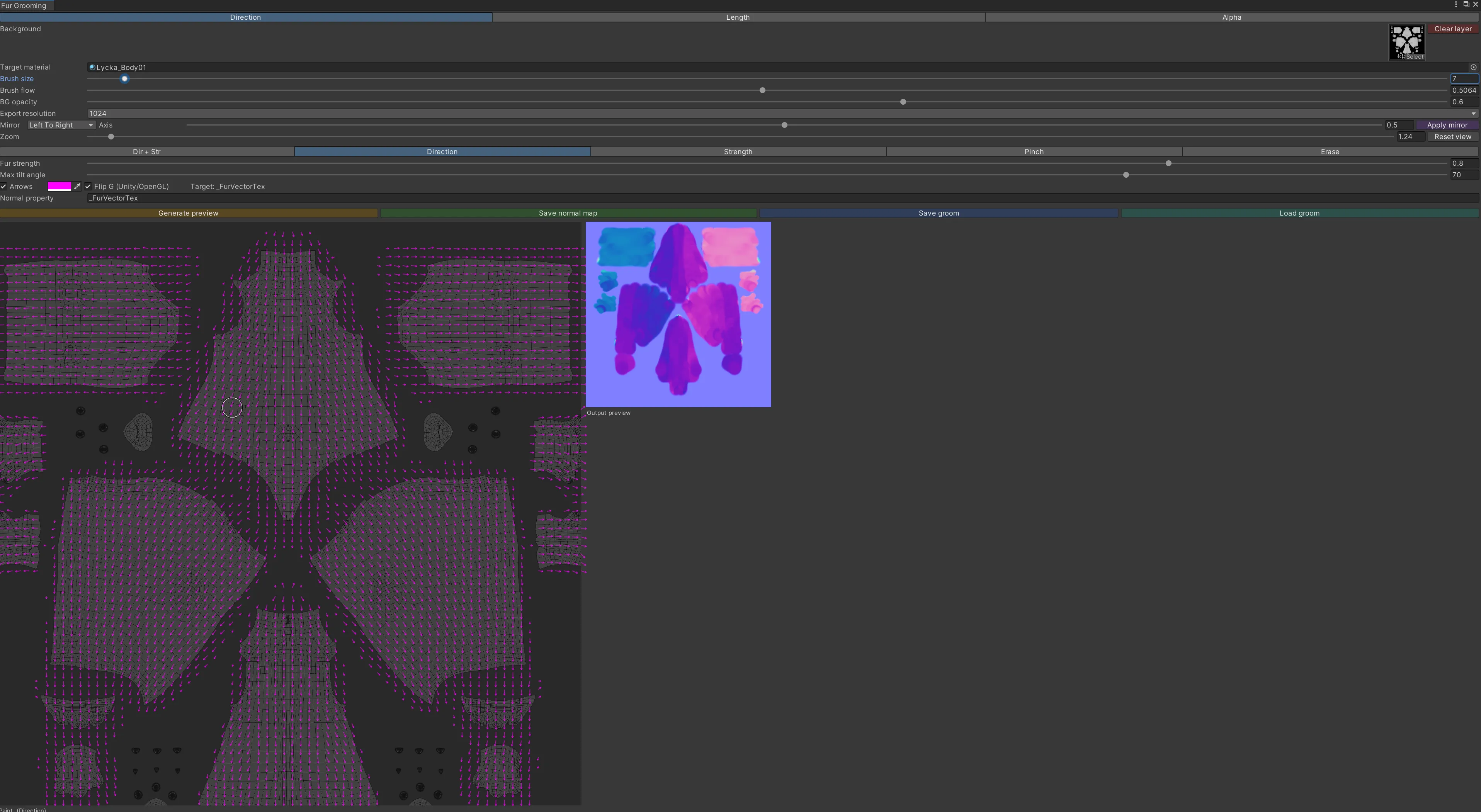
🦊 Fur Grooming Tool Paint your fur maps directly onto the UV layout — right inside Unity.
Youtube! Add to VCC!Fur Grooming Tool is an editor window for authoring liltoon fur textures without leaving Unity. Comb the fur flow, paint how long it grows, and mask where it grows — then export clean, ready-to-use normal and mask textures that snap straight onto your material. No Blender round-trips, no Photoshop, no guesswork.
Three painting modes, a live 3D preview on your model, full symmetry, undo/redo, and one-click export. Editor-only — it adds zero to your avatar's runtime.
✨ Three modes, one window 🧭 Direction — fur flow (normal map) Drag across the UV to comb the fur. Set how strongly it lies down with the tilt strength and max-angle controls. Sub-modes let you edit exactly what you want:
Pinch — converge a tuft to a point (cowlicks, swirls) Direction only / Strength only — tweak one channel without disturbing the other Erase — fade strength back out Live arrow overlay shows the flow as you paint (color-selectable) Flip G toggle for correct Unity/OpenGL orientation Exports a tangent-space normal map 📏 Length — how long the fur grows (grayscale mask) Built for smooth gradients, not flat fills:
Soft brush with adjustable hardness + flow build-up for natural falloff Smudge to melt hard edges into gradients Gradient tool — drag a line for a clean root→tip ramp Smooth all — one-click global blur Right-drag paints black to shorten Exports a grayscale length mask ⚫ Alpha — where fur grows (presence mask) Crisp, binary control for cutouts:
Hard white / black brushes Fill white / Fill black for instant base coverage Threshold + optional soft 1px anti-aliased edge Perfect for paw pads, claws, and fur poking through clothing Exports a crisp presence mask 🎥 See it on your model — live Scene-view brush highlight — a marker shows exactly where your brush is on the actual 3D mesh as you paint. Symmetric/overlapping UVs light up every matching spot (e.g. both sides of the body at once). Adjustable marker shape, color, and size. Smoothed camera follow — the Scene camera glides to whatever you're painting, with optional align-to-surface-normal, distance/zoom, and field-of-view controls. 🪞 Symmetry that actually works Paint one side, hit Apply mirror, done. Mirror left↔right, top↔bottom, or both, with an adjustable axis. For the direction map it correctly flips the flow vectors across the axis, so mirrored fur points the right way — not just a copied image.
🗺️ Grab the UV straight from the mesh No exporting UV snapshots from Blender. Drag your avatar's mesh in and the tool auto-generates the UV wireframe as your paint background. Uses a direct mesh reference (no material guessing), regenerates on assign, with a manual Refresh UV button.
🛠️ Workflow built for real editing Undo / redo — Ctrl+Z, Ctrl+Y (or Ctrl+Shift+Z), plus toolbar buttons. Per stroke and per operation. Zoom & pan — cursor-anchored scroll zoom (up to 16×), middle-drag pan, zoom slider + reset. Paint fine detail on tiny islands like toes. Set-and-forget saving — pick an output folder + base name once; saving writes straight there and overwrites silently (no file dialog every time). Load mask — bring an existing grayscale texture back into Length or Alpha to keep editing. Save / Load groom — store your entire editable session (all three layers) and resume later. Auto-assign — exported maps drop straight onto your material's slot on save. Clean UI — settings grouped into collapsible sections in a scrollable panel, so the paint canvas always stays big. Color-coded action buttons. Export resolution 512–4096, with correct import settings applied automatically (Normal map / linear grayscale, sRGB off). 🧩 liltoon-ready (and shader-agnostic) Defaults target liltoon fur — _FurVectorTex (direction), _FurLengthMask (length), _FurMask (presence) — and the main _BumpMap normal slot. Every target property name is editable, so it works with other shaders too.
✅ Requirements & install Unity 2019.4+ Editor-only — no runtime scripts, no performance cost on your avatar Install via VRChat Creator Companion (add the listing) or import the .unitypackage directly Works on any mesh with a UV0 map 📄 License MIT — free to use, modify, and redistribute. Use it on personal and commercial avatars.