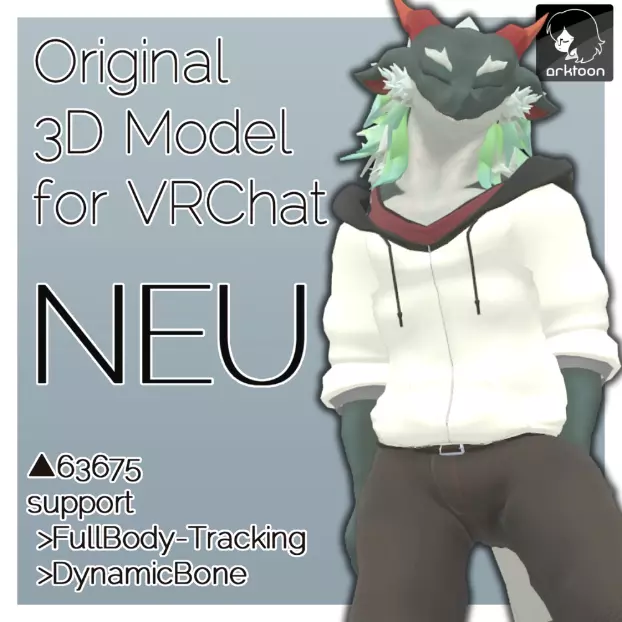
■ Original Ryujin 3D model "neu" ver1.01 This is a 3D model compatible with Unity Humanoid rigs that is supposed to be used in VRChat. Please read the following terms of use and purchase only if you agree. Producer: Dorag [twitter: @drawg_t] ■ Overview --Number of polygons: △ 63675 (no body version) --Texture: 2 (Body 1 sheet 2048x2048, Cloth 1 sheet 2048x2048) --Lip sync, eye tracking support --Full body tracking Correspondence --36 blend shapes (4 types of dummy for VRChat eye tracking, 5 types of lip sync, including facial expressions of combinations) --There is an animation file with facial expressions set (smile, anger, eyes, winks, surprises) Set by yourself You can also use other facial expression shapes. --DynamicBone has been set (ears, tail, hoodie string). We strongly recommend that you install it. --Shader used: Akrtoon-Shaders ( https://booth.pm/ja/items/1027997 ) --Automatic blinking has been set. --NoBlinkSetter V2 ( https://booth.pm/ja/items/1252741) to prevent interference between automatic blinking and facial expressions) Is used. ■ About body data ――For the version with body data, the mesh under the clothes is left unerased, so when you move it, you will get stuck. As an example, when using only the hoodie invisible, it is strongly recommended to erase the mesh of the body under the shirt from the FBX of the body data. ■ Contents --Neu_Package_V1.01.zip ▽ Neu_Package_v1.01.unitypackage └Body.png └Cloth.png └Cloth_bump.png └FBX_neu.fbx └FBX_neu_full.fbx └FBX_neu_full.fbx (* version with element data) └Pref * Automatic blink unset prefab) └ Prefab_neu_full_BLINK (* with element) └ Prefab_neu_full (* automatic blink unset prefab / with element) ▽ Animation (* various animation files) ▽ Materials (* various materials) ▽ FBX folder (* package) (Same as FBX in) └FBX_neu.fbx └FBX_neu_full.fbx (* version with element data) └2 textures (Body.png/Cloth.png) ▽ Texture_PSD folder (* for texture modification) └Body.psd └ Cloth.psd ▽ Readme.txt (* This text) ▽ neu_VRM.vrm (* This is an extra VRM file) ■ Update history -2020/05/31 ver1.01 "Noi" sales start -2020/05/31 ver. The 1.01 license has been changed from the original one to the Uni-Virtual License. ■ Introduction method ・ Unity 2018.4. Introduced 20f1 and created a new project ・ Download VRCSDK2 from VRChat and import it from Unity Assets> Import Package> Custom Package ・ Download DynamicBone and Arktoon-Shaders respectively and import them into Unity in the same way ・ Neu_Package_V1. Import 00.unitypackage ・ Drag and drop "Prefab_neu_BLINK.prefab" in the neu_forsale folder imported into Unity into Scene ・ DynamicBone and VRC_Avatar Descriptor are set in prefab, so upload from VRChatSDK> Show Control Panel as it is You can do it. ■ Terms of Use (as of May 31, 2020) [JP-Terms of Service] This model is released under a UV license. In this model, in addition to the basic clauses, the following acts are permitted based on individual clauses. ・ Personal commercial use permission ・ Corporate use permission ・ Adult expression (sexual expression) permission Please refer to the following URL for the full text. Drag and drop "prefab" into the scene-Dynamic Bone and VRC_Avatar Descriptor are set for prefab, so you can upload it from VRChatSDK> Show Control Panel as it is. ■ Terms of Use (as of May 31, 2020) [JP-Terms of Service] This model is released under a UV license. In this model, in addition to the basic clauses, the following acts are permitted based on individual clauses. ・ Personal commercial use permission ・ Corporate use permission ・ Adult expression (sexual expression) permission Please refer to the following URL for the full text. Drag and drop "prefab" into the scene-Dynamic Bone and VRC_Avatar Descriptor are set for prefab, so you can upload it from VRChatSDK> Show Control Panel as it is. ■ Terms of Use (as of May 31, 2020) [JP-Terms of Service] This model is released under a UV license. In this model, in addition to the basic clauses, the following acts are permitted based on individual clauses. ・ Personal commercial use permission ・ Corporate use permission ・ Adult expression (sexual expression) permission Please refer to the following URL for the full text. https://uv-license.com/ja/license?utf8=%E2%9C%93&pcu=true&ccu=true&seu=true
[ENG-Terms of Use] This model is released under UV license. This model allows the following actions based on Individual terms in addition to the Basic Terms. ・ Personal Commercial Use ・ Corporate Commercial Use ・ For Adults, Sexual Expressions Use For the full text of the rules, please refer to the following URL. Https://uv-license.com/ en / license? utf8 =% E2% 9C% 93 & pcu = true & ccu = true & seu = true
■ Disclaimer ・ The creators are not responsible for any trouble or loss caused by using this model. ・ For inquiries, please contact us via a direct message on Twitter (@drawg_t). ■ Working environment --Blender 2.82 --CLIP STUDIO PAINT --Adobe Photo Shop CC 2017 --Operation confirmed with HTC Vive + Vive tracker