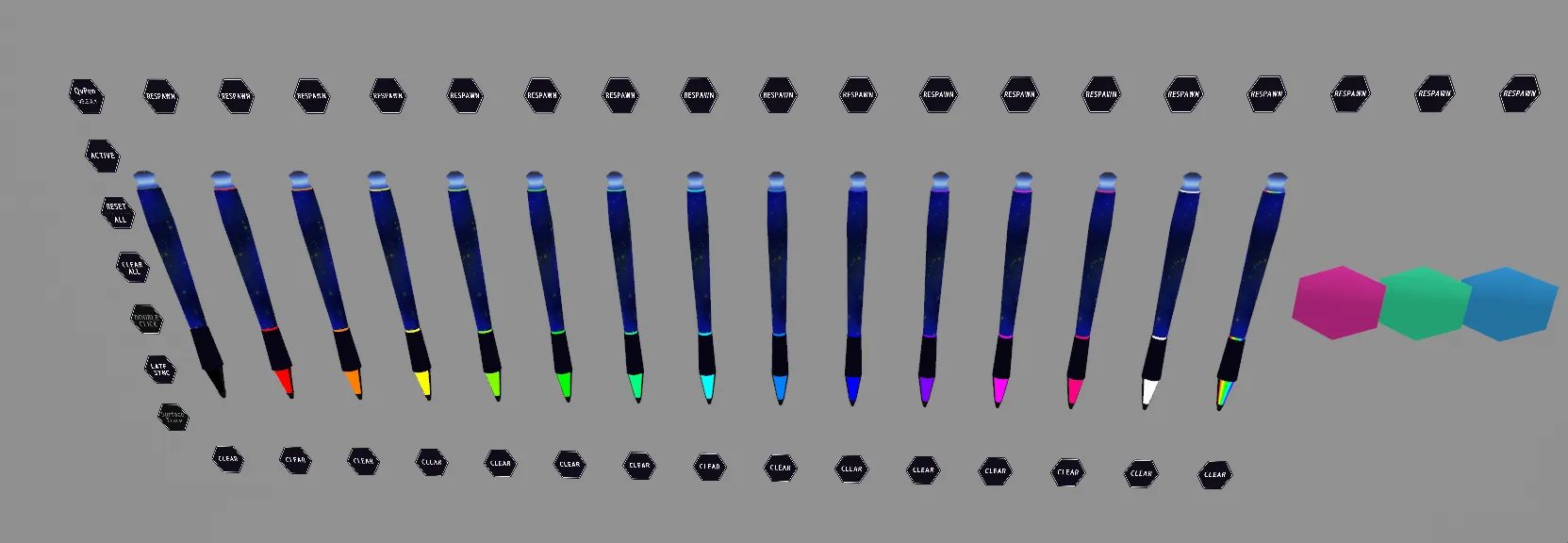
軽量で汎用的なPackage Shop @aivrc様 QvPen差し替えモデル&UIです。
内容物 先にQvPenを導入してください コチラ→ https://booth.pm/ja/items/1555789
※先にこのオリジナルQvPenをワールドに設置して、インクが出ることをご確認ください。
Shal > Pen > ・QvPen(glad)-NoEraser 消しゴム削除版プレハブ ・QvPen(glad)-Shal フルセット版プレハブ ・Material ・Mesh (penモデル △808) ・Texture
色マテリアルはVRChat/Mobile/Lightmappedを利用していますが、影を付けたい場合はDiffuseまたはStandardに切り替えてください。 Material内で複数選択して一括で切り替え可能です。 ※簡単にシェーダーを切り替えられるよう色を画像で設定しているため、もし色を変更する場合は色画像も併せて変更する必要があります。
Quest対応時のマテリアルは以下を推奨します。 ・Base: VRChat/Mobile/Bumped Diffuse 他はそのままでOK!
サンプルを以下のワールドに設置していますのでぜひご確認ください。(v3.3.0) シャルジム 2号店 (Shal Gym) https://vrchat.com/home/launch?worldId=wrld_c4c31c10-c855-4275-bc13-82c26a01162b
更新履歴 2025/01/07 v3.3.0リリース(QvPen v3.3.x対応版) 2022/08/27 v1.0.0リリース
動作確認環境 PCVR/Quest2単体で確認しています。 v.3.3.0 QvPen v3.3.3 VRChat SDK - Base 3.7.5
v.1.0.0 QvPen v3.2.5.1
-
VCC VRChat SDK - Base 3.1.7 VRChat SDK - World 3.1.7 UdonSharp 1.1.1
-
その前 VRCSDK3-WORLD-2022.08.29.20.48_Public UdonSharp_v0.20.3
FAQ Q. インクが出ません A. 本家オリジナルのQvPenを設置し、インクが出ることを確認してから本差し替えモデルを導入ください。
Q. ペンの太さ調整は可能? A. 本家の機能にて可能です。 Hierarchyに置いたQvPen(glad)-Shal > Pens > PenManager (X) をクリックしてInspectorで開き、Ink Width を調整ください。 注意点として、すべてのPenManagerのInk Width値を揃えてからご確認ください。(QvPen v3.2.4.1)
利用規約/免責事項 ・本データをダウンロードした時点で規約に同意したものとみなします。 ・本データを利用したことによって生じるいかなる損害に対して当方は一切責任を負いません。 ・改変OK!
以下の行為を禁止します。 ・本データを再配布・再利用可能な状態で公開する事 ・他者を誹謗中傷する表現、政治、宗教活動への使用 ・本データの制作者を偽る行為
This is a lightweight and versatile package from Package Shop @aivrc: a QvPen replacement model and UI.
Please install QvPen first here → https://booth.pm/ja/items/1555789
*Please place this original QvPen in your world first and confirm that ink is coming out. Shal > Pen > ・QvPen(glad)-NoEraser Eraser removed prefab ・QvPen(glad)-Shal Full set prefab ・Material ・Mesh (pen model △808) ・Texture The color material uses VRChat/Mobile/Lightmapped, but if you want to add shadows, please switch to Diffuse or Standard. You can select multiple in Material and switch them all at once. *Since the colors are set as images so that you can easily switch shaders, if you change the color, you will also need to change the color image. The following materials are recommended for Quest compatibility: ・Base: VRChat/Mobile/Bumped Diffuse Others are OK as they are! A sample has been placed in the following world, so please check it out. (v3.3.0) Shal Gym 2nd Branch https://vrchat.com/home/launch?worldId=wrld_c4c31c10-c855-4275-bc13-82c26a01162b
Update History Released v3.3.0 on 2025/01/07 (QvPen v3.3.x compatible version) Released v1.0.0 on 2022/08/27
Operating environment Tested on PCVR/Quest2 alone. v.3.3.0 QvPen v3.3.3 VRChat SDK - Base 3.7.5 v.1.0.0 QvPen v3.2.5.1 * VCC VRChat SDK - Base 3.1.7 VRChat SDK - World 3.1.7 UdonSharp 1.1.1 * Previously VRCSDK3-WORLD-2022.08.29.20.48_Public UdonSharp_v0.20.3
FAQ Q. No ink is coming out. A. Please install the original QvPen and confirm that the ink is coming out before installing this replacement model. Q. Is it possible to adjust the pen thickness? A. Yes, it is possible using the original software's functions. Click on QvPen(glad)-Shal > Pens > PenManager (X) in the Hierarchy to open it in the Inspector and adjust the Ink Width. Please note that you should ensure that the Ink Width value is the same for all PenManagers before checking. (QvPen v3.2.4.1)
Use of Terms and Conditions/Disclaimers • By downloading this data, you are deemed to have agreed to the terms and conditions. • We are not responsible for any damages resulting from the use of this data. • Modification is permitted! The following actions are prohibited: • Redistributing or making this data available for reuse • Using this data for defamatory or libelous expressions, political or religious activities • Impersonating the creator of this data